Blog
CATEGORY: Deliverability
Maintaining deliverability to Microsoft contacts
Affected contact addresses: outlook, Hotmail and live.com
Since 2025 and increasingly into 2026, Microsoft has fundamentally strengthened how it filters incoming email, driven by advanced AI-powered systems analysing sender reputation, engagement and trust signals. This shift represents one of the most significant changes to Outlook/Hotmail/Office 365 deliverability in years — and it’s not just a tweak, but a structural overhaul that affects how email is accepted, delivered or outright rejected.
AI is now central to filtering decisions
Rather than relying primarily on traditional signature or keyword-based scans, Microsoft’s mail systems now incorporate machine learning and AI models that evaluate each message on multiple dynamic criteria. These models look beyond simple spam markers to assess:
Sender reputation
Link trustworthiness
Real user interaction, such as opens, deletes, and spam complaints
This AI-centric approach allows Microsoft to better distinguish legitimate mail from increasingly sophisticated unwanted messages, but it also raises the bar significantly for legitimate senders.
The acceleration of this transition was confirmed in Microsoft’s own documentation and via industry analysis: AI-driven signals are now a core part of bulk sender intelligence and real-time filtering.
Hard filters replacing soft warnings
Historically, non-conforming messages were often delivered to Junk folders with warnings as a form of soft enforcement. However, as Microsoft’s AI models have matured, those warnings have been replaced by hard rules:
Messages may be rejected at the SMTP level
Certain signals (poor reputation, unverified sender authentication, suspected low engagement) can trigger automatic blocking
In many cases, there’s no fallback to Junk, mail simply never reaches the mailbox
This transition to AI-enforced blocking reflects Microsoft’s confidence in its models’ ability to distinguish harmful from legitimate mail.
Real engagement matters more than ever
One of the most consequential changes is how engagement data feeds into Microsoft’s AI scoring. Traditional filters treated user interactions as secondary signals; the new models treat them as core reputation metrics. For example:
A high rate of opens and replies now boosts reputation
A high rate of deletes without opens or spam complaints lowers reputation
Engagement trends over time matter more than just volume or IP history
This means that AI is learning from how real users interact with mail and making acceptance decisions based on how likely messages are wanted, not just whether they contain known spam traits.
Why this matters for organisations
The practical impact of Microsoft’s AI-powered filtering is making a significant and noticeable difference:
Messages that once delivered reliably may now be deferred or rejected
Traditional blast-and-prune campaigns can trigger reputation penalties
Even legitimate business systems can be filtered if sender signals are weak
Microsoft’s own anti-spam guidance now makes clear that authentication, engagement and trust signals need to align for mail to be accepted, and AI models are the engine making these determinations.
AI-driven defences for mailboxes too
It’s not only sender-side filtering that’s changed. Microsoft has also rolled out AI-backed mailbox security features to more users, many of whom may be unaware that these protections are active on their accounts. These defender technologies work in tandem with server-side filters to quarantine or block messages based on nuanced risk assessments from machine learning.
The future of email filtering
Microsoft’s embrace of AI for email filtering is a sign of how seriously major providers now take threat detection, user experience and mailbox safety. In practice, this means:
Static rules are giving way to adaptive models
User signals are weighted more heavily than ever
Reputation is dynamic, continuous predictive and no longer static
For senders and organisations, adapting to this new reality means understanding that AI is now the gatekeeper — and that trust, engagement and authentication are the signals it values most.
What should you do if you notice Microsoft bounces on your campaign sends?
Typically, Microsoft bounces will consist of:
smtp;550 5.7.1 Unfortunately, messages from [0.0.0.0] weren't sent. Please contact your Internet service provider since part of their network is on our block list (S3150). You can also refer your provider to http://mail.live.com/mail/troubleshooting.aspx#errors. [Name=Protocol Filter Agent][AGT=PFA][MxId=11BCD05B3E768AA1] [DS2PEPF00003448.namprd04.prod.outlook.com 2026-02-12T11:34:49.255Z 08DE682DA1DC42A2]
This means that your sender score/ reputation with Microsoft (e.g. outlook.com, Hotmail.com, Live.com) has dropped, the way in which we can fix this is by temporarily removing the disengaged and slipping away Microsoft contacts. For a minimum of two weeks, once the two weeks have passed you can gradually start to add the Microsoft contacts back into your live campaign sends. This can be done by using a saved filter to remove any disengaged and slipping away contacts on the campaign stage.
Ensure that when you add the slipping away and disengaged contacts back in, your engaged contacts amount of double of the disengaged and slipping away contacts
In addition to this, you could also validate your data to ensure that you are sending to valid email addresses and contacts which want to hear from you.
Find out more about Microsoft using AI to determine how to interpret your emails:
Microsoft Exchange Spam Filtering Update 2026 Explained | Mailbird
Microsoft Enforces New Outlook Email Rules in 2026 — What SMBs Must Fix Now
Changes to Microsoft's deliverability rules in May 2025
Anti-spam protection FAQ - Microsoft Defender for Office 365 | Microsoft Learn
What’s changing with Microsoft 365 - and what it means for you - Phoenix Software
What should you do with your Microsoft disengaged contacts?
When disengaged contacts present themselves within your CRM there’s different ways which you can, the most popular way is running a disengagement campaign , this means sending to disengaged contact so that they can update their preferences and this leaves your contacts to decide whether they are interested and want to hear from your or if they choose to unsubscribe.
Learn how to reduce disengagement or run a re-engagement campaign.
You may also like these blogs
News Public Sector e-shot-team
Forfront & e-shot achieve second consecutive Tech200 listing
February 17th, 2026 - Harry Thomas
Forfront and e-shot have once again been named in the Tech200, marking our second consecutive year in the prestigious list of the UK’s...
Public sector email benchmarks for 2026
January 5th, 2026 - Harry Thomas
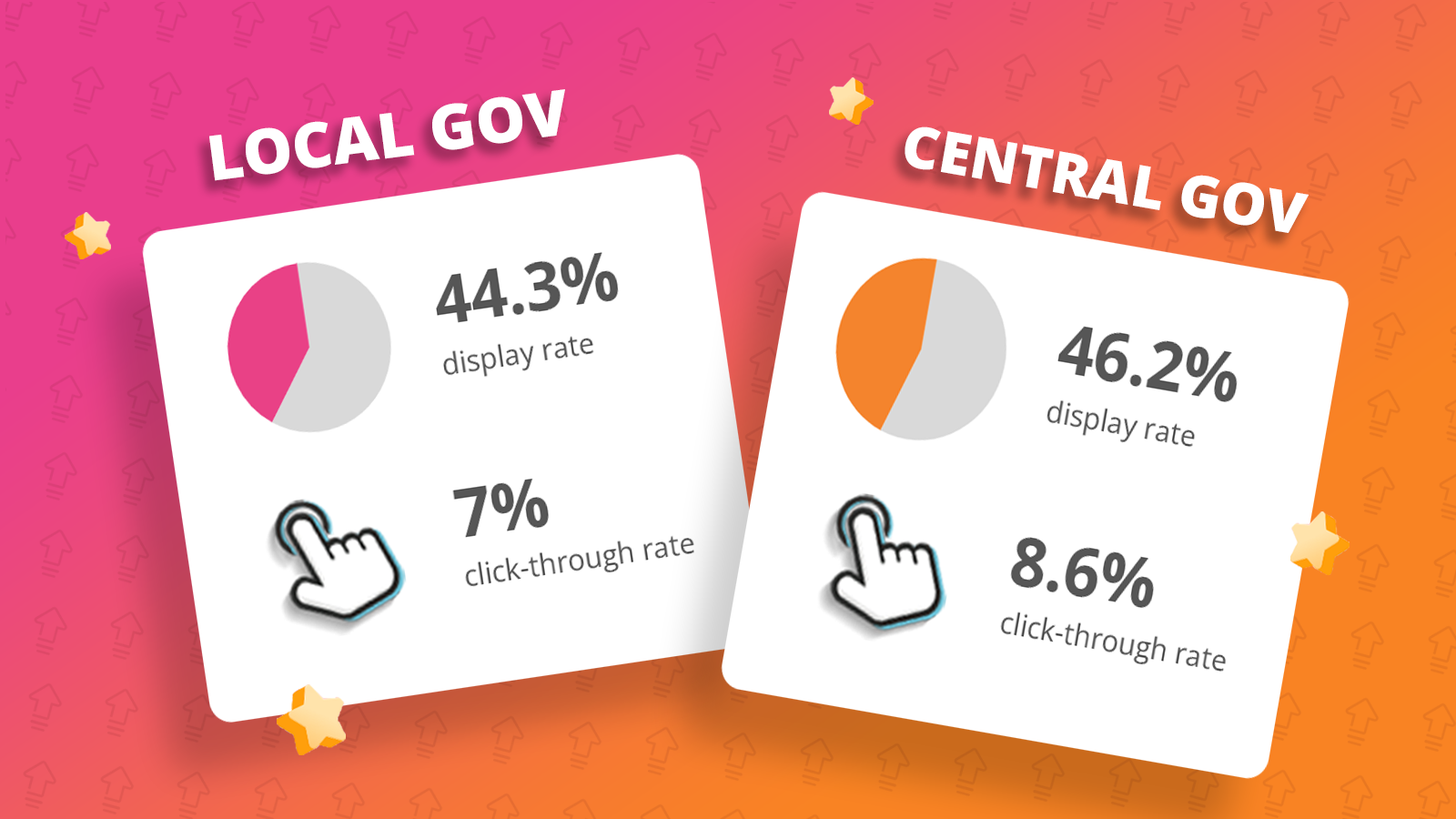
What the data from 300 million public sector emails sent last year shows us (and what it doesn’t) This report summarises the 2025 performance over...
5 Practical steps to build your email newsletter audience
July 15th, 2025 - Harry Thomas
If you're responsible for communications in a local authority or other public sector organisation, you already know that email newsletters are...
Solutions

Email Marketing
Create email campaigns and newsletters and manage end-to-end subscription processes with forms and preferences.

Marketing Automation
Create sophisticated automated campaigns for email and SMS combined.

Digital Communication
The comprehensive solution to manage and automate your digital communication across email, SMS, websites and landing pages.

Email marketing healthcheck
We are confident that we can help you, which is why we offer a free healthcheck to identify potential issues with your current programme and free advice on things that could be done to improve it.