Help articles
CATEGORY: FAQsWhatsApp
Understanding WhatsApp messaging limits & credits
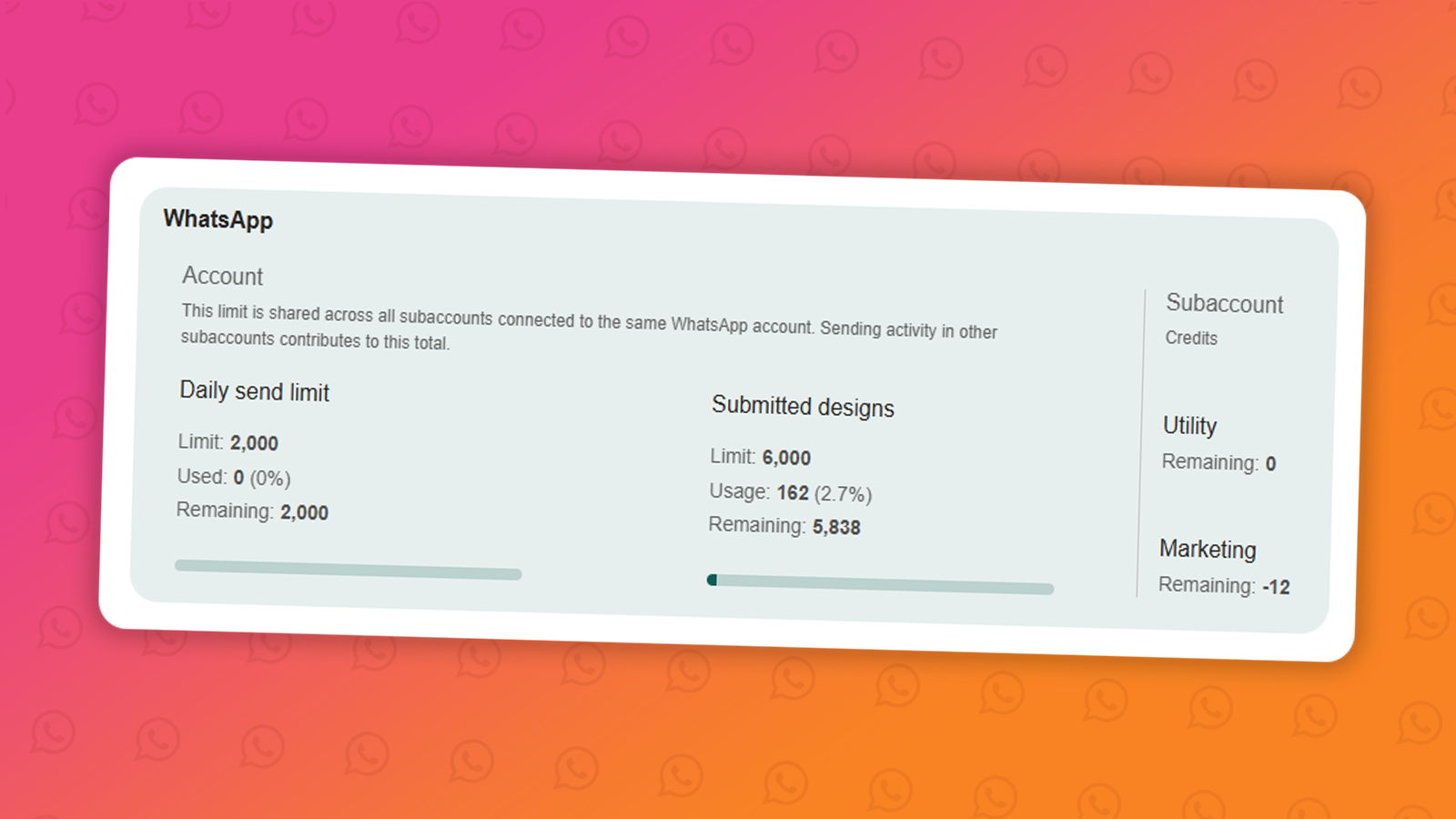
When sending WhatsApp messages through the e-shot platform, there are two types of limits you should be aware of: your daily send limit and your credit balance. Understanding both will help you plan your messaging campaigns effectively.
Daily send limit
Your daily send limit controls how many unique contacts you can send messages to within a 24-hour period. This limit is set by Meta (the company behind WhatsApp) and applies to your WhatsApp Business account; it is not something e-shot controls directly.
The limit determines the number of new conversations your business can initiate within 24 hours. A new conversation begins when you send your first template message to a customer.
Your daily limit depends on your Meta account status:
250/day: Unverified business portfolio without an approved display name
1,000/day: Verified business (starting level)
10,000/day: Scaled up based on quality and volume
100,000/day: Higher tier
Unlimited: Highest level
You start at 1,000 and can move up based on your phone number status, phone number quality rating, and the frequency of your messages to new customers.
Tip: You can check your current daily limit in your Account Settings under the Account Summary tab > WhatsApp.
How to increase your limit:
Messaging limits are now applied at the Business Portfolio level, meaning all phone numbers within the same portfolio share the same messaging limit. To move up tiers, maintain a high message quality rating and consistently send to a growing number of unique contacts.
Credits
Credits is our way of tracking and billing WhatsApp message usage. Unlike the daily send limit (which is controlled by Meta), credits are managed by yourselves and the e-shot team.
Credits are purchased and stored in your account balance.
Each message you send consumes credits from your balance.
When your credit balance runs out, messages will stop sending until you top up.
Important: Even if you have credits available, you cannot exceed your Meta daily send limit. Both limits must be satisfied for a message to be sent successfully.
The cost per conversation depends on the message category:
Marketing messages: messages with a promotional element, such as a newsletter or event promotion.
Marketing message credits are available in the following bundles:
10,000 credits – 5.0p per conversation - £500
50,000 credits – 5.0p per conversation - £2,500
100,000 credits – 5.0p per conversation - £5,000
Utility messages: non-promotional messages that are purely informational or service related such as bin reminders or council tax updates.
Utility message credits are available in the following bundles:
10,000 credits – 2.0p per conversation - £100
50,000 credits – 2.0p per conversation - £1,000
100,000 credits – 2.0p per conversation - £2,000
All amounts are shown in pounds sterling (£) and exclude VAT. Please note that G-Cloud pricing for SMS and WhatsApp is indicative only. Prices are based on charges set by mobile network operators and Meta, the owner of the WhatsApp platform, and may change due to factors outside our control.
Key differences between send limits and credits at a glance
Set by
Limit: Meta (WhatsApp)
Credits: e-shot
Resets
Limit: Every 24 hours
Credits: When you purchase more
Controls
Limit: How many contacts you can reach per day
Credits: Whether you have balance to send
How to increase
Limit: Improve account quality & volume
Credits: Purchase more credits
Need Help?
If you're unsure of your current daily limit or credit balance, head to your account settings dashboard or get in touch with our support team via the live chat.
You may also like these articles
Designs WhatsApp
Understanding WhatsApp message design statuses
January 1st, 2027 - Harry Thomas
Before you can send a WhatsApp message to your contacts, any design you create must go through a review process managed by Meta. Once submitted,...
Designs WhatsApp
How to create a WhatsApp design
January 1st, 2027 - Harry Thomas
Designs are the message templates you send to your audience via WhatsApp. Before a design can be used in a campaign, it must be submitted to Meta...
Designs FAQs WhatsApp
WhatsApp Marketing vs Utility messages
January 1st, 2027 - Harry Thomas
When creating a new WhatsApp message design, you'll be asked to choose a message type: Marketing or Utility. Choosing the right one is...
Solutions
Email Marketing
Create email campaigns and newsletters and manage end-to-end subscription processes with forms and preferences.

Marketing Automation
Create sophisticated automated campaigns for email and SMS combined.

Digital Communication
The comprehensive solution to manage and automate your digital communication across email, SMS, websites and landing pages.

Email marketing healthcheck
We are confident that we can help you, which is why we offer a free healthcheck to identify potential issues with your current programme and free advice on things that could be done to improve it.