Help articles
CATEGORY: FAQsCampaigns
How to use e-shot for re-targeting
What is re-targeting?
Retargeting, also known as remarketing, is a method used to reach out to someone you previously made contact with. Retargeting is often done on a website basis, such as an abandoned basket but retargeting can also be done for email communications. For example, you may send an email campaign and retarget those that clicked a certain link or did/did not open the email.
By focusing on certain actions, it allows you to potentially get more out of your campaign, such as pushing those who nearly purchased something over the line or getting more people to engage with your comms.
Retargeting allows you to keep your brand in front of those that are interested after they have performed a certain action or allows you to increase your audiences size.
The two most basic goals you can set for your remarketing campaigns are:
Awareness: Awareness campaigns are used to inform visitors about your product features and other announcements. This is a less targeted goal because it’s directed at visitors who haven’t interacted a lot with your business. You can run awareness campaigns as a precursor for your conversion campaigns.
Conversion: Conversion campaigns are used for visitors who are more familiar with your brand and its products or services. But they still haven’t committed to an offer, so you want them to click on the ad, direct them to a post-click landing page, and convince them to convert.
How can e-shot help with retargeting?
There are a several ways e-shot can help you retarget. These options include using campaign performance filtering, automated series and website tracking.
Campaign performance filtering
On a single send campaign, under the advanced tab. You have the option to apply ‘Performance filtering’. This filtering method allows you to filter a campaigns audience on previous campaigns send data and interaction data. For example, if you wanted to retarget contacts who opened or didn't open a particular email, you can do so.
To use interaction filtering, send filtering must first be applied. Below you can see all the filter options available that can be used to retarget using previous campaigns analytics as well as an example of how you can retarget the contacts that opened/displayed a specific campaign.
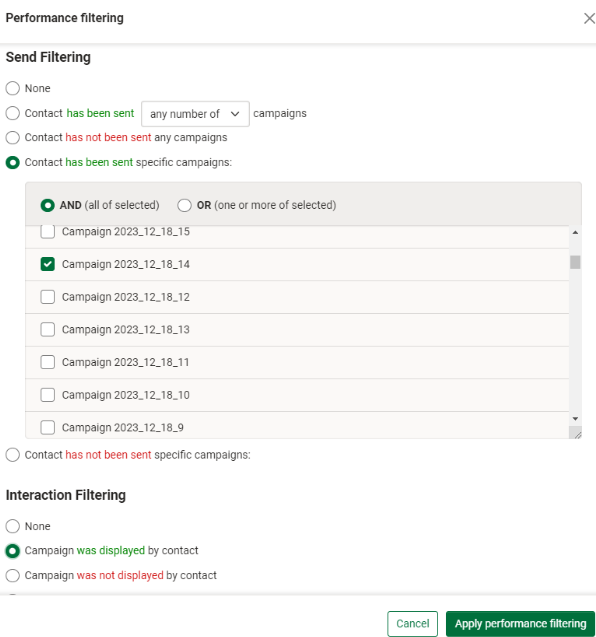
For the full detail on how to add performance filtering, please find our dedicated help article here.
Website tracking
With e-shot ultimate you can track website visitors’ activity in several ways for example;
The number of and duration on pages they have viewed
If they have viewed key selling pages or specific pages
Automated series
Leading on from website tracking, this behavioural information can be used as a trigger, you can then use in automations to react in a variety of ways for example;
Notify a team member i.e. sales person or account manager after a certain action is performed
Add the contact to a group (which can then be automatically transferred to a social audience or google remarketing audience)
Send a highly targeted email or trigger an email nurture series
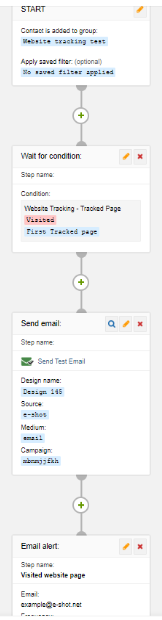
Below you can see an automated series’ example of someone visiting a specified page then sending an email notification. The steps are as follows ‘Contacted added to X group > Contact visits X page > Send contact X email > Notify X email address’.
Solutions

Email Marketing
Create email campaigns and newsletters and manage end-to-end subscription processes with forms and preferences.

Marketing Automation
Create sophisticated automated campaigns for email and SMS combined.

Digital Communication
The comprehensive solution to manage and automate your digital communication across email, SMS, websites and landing pages.

Email marketing healthcheck
We are confident that we can help you, which is why we offer a free healthcheck to identify potential issues with your current programme and free advice on things that could be done to improve it.