Help articles
CATEGORY: DeliverabilityFAQsAnalyticsCRM
Understanding bounces

What is a bounce?
First, let's explain what a bounce is. In simple terms, a bounce is an email message that gets rejected by a mail server. When an email bounces, for one reason or another, it has not reached the intended destination.
There are two types of bounces, a soft bounce and a hard bounce. A soft bounce is a temporary short-term block, such as the recipient's mailbox being full. Whereas a hard bounce is permanent, a common example would be a misspelled email address. For more details on soft and hard bounces, see our dedicated help article here.
Where can you find your bounces in e-shot?
There are a couple areas of the system you can access your bounced contacts in e-shot, such as the CRM and analytics pages.
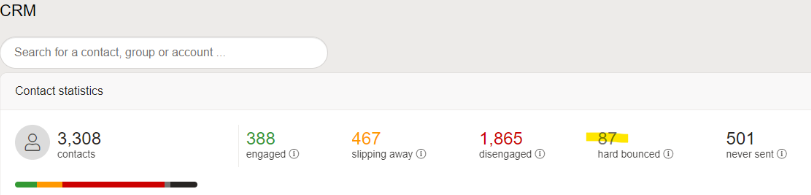
The easiest way to access your bounces is by heading to the CRM homepage. From here you are given your contact overview and are provided with the exact number of hard bounces in your subaccount currently. This number can be clicked into to see who those contacts are and find out what campaign they bounced in.
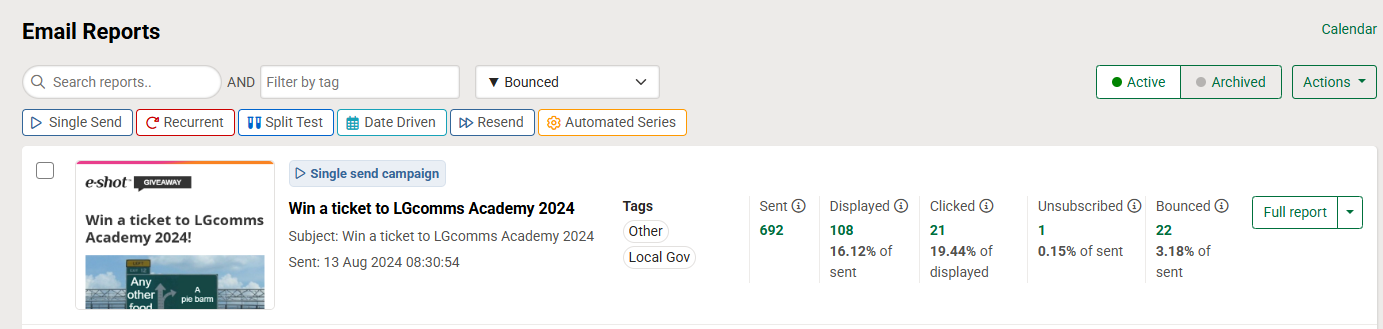
From the Analytics > Email reports page, you are given the basis statistics from the delivered emails to the number of unique clicks, here you are also given a ‘Bounces’ number. This includes soft and hard bounces and is specific just to that particular campaign. Like with the CRM the number can be clicked into to see who exactly has bounced.
Analysing your campaigns bounces
Using the ‘View full report’ button next to your campaign, takes you to a page with more in depth analysis for that campaign including several reports. These reports can be downloaded and several of them include the bounced contact data.
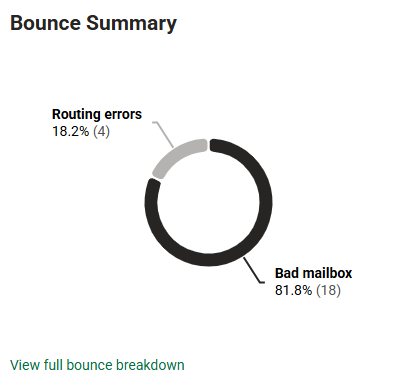
On this page there is also a ‘Bounce summary’ pie chart that tells you the type of bounces that occurred for the bounced contacts.
As previously mentioned, from the email reports page, you can click into the bounces to see which email addresses bounced.
Once this number is clicked into, you will be given data such as, the bounce type, bounce category, bounce reason and the time the bounce was logged.
What are the most common reported bounce types?
Policy related bounces are due to recipients’ emails personal policies.
Blacklisted related bounces are cause by the sending domain being blacklisted on a site which prevents some recipients from receiving the email.
Other related bounces include smaller categories such as being spam related.
Unclassified related bounces are bounces that we are unaware of why they should’ve been bounced.
Routing errors in relation to bounces are caused by the routing of the email recipient's emails which can cause them to get lost.
A bad mailbox related bounces are those of which the email address is hard bounces therefore non-existent or an invalid address.
*Please note: Most bounces will appear within 4 hours, but some could take up to 72 based retries to deliver which can continue for up to 2 days after the original send.
How we handle bounces
We work hard to keep bounces as low as possible so we can deliver as many of your emails as possible. We constantly monitor the email acceptance rates of our outgoing IP addresses and use sophisticated algorithms to automatically adjust sending rates, as well as giving you the opportunity to control send throttling as part of your campaign set up. We also monitor user behaviour and employ queueing technology to ensure that ISPs are not overloaded.
As mentioned earlier, when an email address appears in the ‘Bounce Summary’ report it means we are no longer attempting to deliver your campaign to that email address. However, unless it's a hard bounce, we do make repeated attempts to deliver the email for up to 2 days.
One of the great advantages of being a part of the e-shot™ system is being able to benefit from our vast experience in sending billions of emails. We are constantly monitoring email behaviour across the platform which ensures that any address found to be invalid or marked as Hard Bounce is automatically suppressed from future sends. By identifying hard bounce email addresses from future sends, you reduce the risk of your sends being blocked by ISPs which will result in better reputation and better deliverability. When you import a new list of addresses, you will benefit from not sending to addresses previously found to be invalid and increase your deliverability.
In short, known bounced email addresses are automatically suppressed within a subaccount from your list without affecting your reputation.
You may also like these articles
Best practice Deliverability
Hard bounce vs soft bounce: What's the difference?
August 26th, 2026 - Sadie Burgess
According to the DMA's Marketer Email Tracker 2026, email remains a core marketing channel, with 74-83% of marketers using it across every...

FAQs CRM Analytics
Hard bounce resets
February 10th, 2020 - Sadie Burgess
Sometimes, email addresses will become undeliverable due to erroneous bounce reasons being reported back to e-shot by the recipient’s email server....

Best practice
Maintaining your email marketing database
February 22nd, 2019 - Dan Hare
Your email marketing database is like a plant. It needs to be continually fed, watered and pruned if it is to stay in good health, yet...
Solutions

Email Marketing
Create email campaigns and newsletters and manage end-to-end subscription processes with forms and preferences.

Marketing Automation
Create sophisticated automated campaigns for email and SMS combined.

Digital Communication
The comprehensive solution to manage and automate your digital communication across email, SMS, websites and landing pages.

Email marketing healthcheck
We are confident that we can help you, which is why we offer a free healthcheck to identify potential issues with your current programme and free advice on things that could be done to improve it.