Help articles
CATEGORY: CampaignsFAQs
SMS FAQs
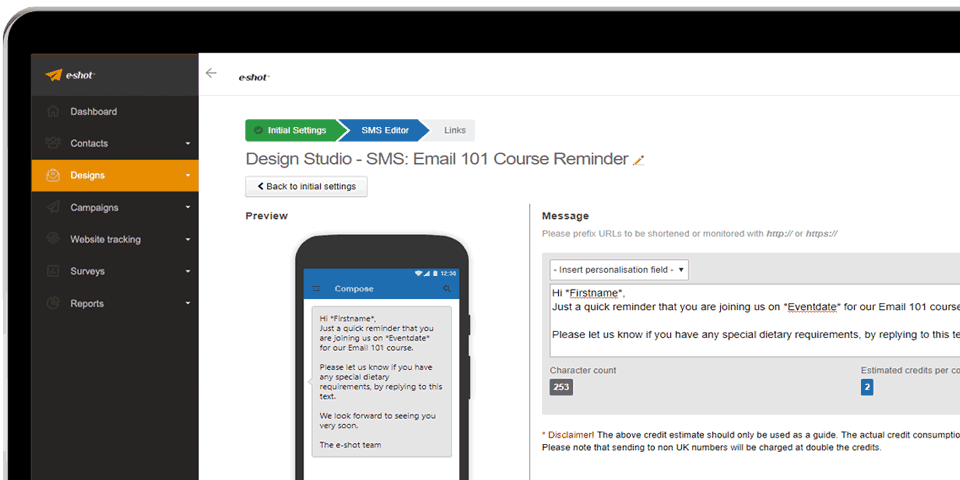
What is SMS?
SMS stands for Short Message Service and is also commonly referred to as a "text message". With an SMS, you can send a message of up to 160 characters to a mobile phone number. Longer messages will automatically be split up into smaller messages of 160 characters each (up to 4 max per SMS send). Most mobile phones support this type of text messaging, but we recommend keeping marketing SMS as short as possible.
How do I start sending SMS text messages through e-shot?
If you would like to use e-shot to send SMS text messages, you will need to contact to The Customer Success team who will talk you through the process and help you set it up.
How do I pay?
SMS credits can be added to your existing e-shot subscription or paid for in batches as and when you need them.
What counts as a credit?
One credit pays for one standard text message to one contact. For example, a 160-character message to 50 people would account for 50 credits.
When will you charge more than one credit?
Messages that are longer than 160 characters or when you send to international numbers. The pricing for longer (concatenated) text messages are charged as follows:
161 to 306 characters = 2 credits
307 to 459 characters = 3 credits
460 to 612 characters = 4 credits (this is the max)
Some characters are “compound” characters and use two characters in a message.
Please note that when you use personalisation in your text content, you may exceed the 160 characters.
International sends are charged as double the credits. If you send over 460 characters to an international number, you will be charged 8 credits.
US/Canadian networks can only handle up to 160 characters. Longer messages will be rejected by the network.
Is it legal to send text messages to mobile numbers?
You must have a lawful basis for sending SMS in line with current Data Protection legislation. We do not tolerate SPAM. Please be sure to check our terms and conditions and our Anti-SPAM policy.
Can my contacts unsubscribe (opt out) from SMS?
Yes they can (by replying STOP) and they will automatically be unsubscribed from future SMS campaigns. We will not allow SMS to be sent to an unsubscribed contact unless evidence of them resubscribing is provided.
How do I enable unsubscribe (opt-out) in my text messages?
Just add: ‘Reply STOP to opt-out' at the end of your message’. We will do the rest.
Can you, the user unsubscribe a contact from receiving SMSs?
Yes, a contact can be marked as unsubscribed in the UI on their contact record.
When a contact on my list unsubscribes will they be unsubscribed from email too?
No, only from SMS unless they use a Preference Centre to opt out of both email and SMS.
How do I acquire a new From Number and can I have multiple ones?
You can have more than one number, and these will be set up for you as identities –similar to if you have multiple email identities. If you know which country you are going to send to and it’s not the UK, please let us know.
Why do I need to pay for a From Number?
In much the same way as you pay for a SIM card for your mobile phone, we have to register and pay the network for your From Number.
Can I use my own mobile phone number?
Not as a From number but we can arrange for your replies to be emailed to a designated email address.
Can I have multiple phone numbers for the same Contact?
Yes but only with a different email address (you cannot have 2 or more contact records with the same email address).
If I have the same mobile phone number on multiple contacts and a campaign is sent will it sent and charge multiple messages?
No, we will only send and charge one credit for each mobile phone number.
Can I have different contact numbers for contacts found in different subaccounts?
Yes.
What field should I use for the mobile phone number?
You have to import the contacts mobile phone number into the mobile field which is one of the standard e-shot contact fields.
What is an SMS Bounce?
We mark mobile numbers as Bounces when the network responds with “Declined”. It means that the network is unable to deliver (e.g. out of signal / phone switched off / inactive number).
What are the delivery reports for SMS?
For SMS we report on delivery status:
Delivered (confirmed) - Messages which were successfully delivered to the contact's mobile and have been confirmed by the provider;
Delivered (unconfirmed) - Messages which have been sent via a provider that does not supply receipts regarding the status of the SMS;
Pending with network - Messages which are yet to be delivered to the contact's mobile e.g. the mobile is switched off or it does not have signal.
Can you register clicks on links?
Yes, links can be used in SMS messages and e-shot will record and monitor these links. Monitored links are shortened to try and use as fewer characters as possible.
If a link is clicked in the message, it will also be reported as delivery confirmed.
If an SMS was sent to a valid but unavailable phone number will I get charged?
For a valid but unavailable phone number you will be charged, and it might result in a “Delivery Unconfirmed” or “Pending with Network”.
Can I use personalisation?
You can include dynamic content from the contact record in SMS sent from e-shot. This can be as simple as first name personalisation or as sophisticated as contact centric dates and URLs to enable reminders and things like shopping cart abandonment.
Can I create an automations using the SMS feature?
SMS is supported as part of our Automated Series tool, meaning you can create SMS-specific automations or mix them with emails to deliver multi-channel automated journeys.
Can I send Images in my SMS?
No.
Can I send an SMS from a Name instead of a Number (e.g. Coke)
Yes, it is possible, but you would need to include an opt-out number in the message so that your contacts can unsubscribe.
How do I view my SMS campaign analytics?
Similar to with email campaigns, once an SMS message has been sent it will move to your analytics. To view your analytics from all sent SMS messages, head to Analytics > SMS reports.
Where can I see any replies made to my SMS campaign?
Under Analytics, you will find the menu item SMS responses. Here you will find the details of the contact, the campaign they are replying to and their reply. Replies sent will also be sent to the reply email address you specify when setting up SMS on your account.
Solutions

Email Marketing
Create email campaigns and newsletters and manage end-to-end subscription processes with forms and preferences.

Marketing Automation
Create sophisticated automated campaigns for email and SMS combined.

Digital Communication
The comprehensive solution to manage and automate your digital communication across email, SMS, websites and landing pages.

Email marketing healthcheck
We are confident that we can help you, which is why we offer a free healthcheck to identify potential issues with your current programme and free advice on things that could be done to improve it.