Blog
CATEGORY: DeliverabilityPublic SectorNewsBest practice
Does Apple think your newsletter is a promotion? Apple Mail iOS 18 changes

In the recent Apple Event, new details came to light about what to expect in iOS 18. In this blog we will cover some of the key changes and how they may affect your email marketing.
Before we dive into some of these changes, firstly why, as email marketers, should we be paying attention to what Apple are doing? The answer to that question is, Apple has a large number of the email client usage, and it could continue to grow.
As of September 2024, Litmus’ tests from 1.1 billion opens shows Apple has a whopping 53.67% market share, over 20% larger than second placed Gmail (30.70%).
It’s important to note that all the updates available in this blog are not available for all iPhone users. It’s only available for users on at least iOS 18.2 which was released in December 2024. As well as this you must be using either an iPhone 15 Pro or Pro Max or any iPhone 16 to the latest models. And to state the obvious, these features are also only available on the Apple Mail app not others such as Gmail.
Apple Intelligence
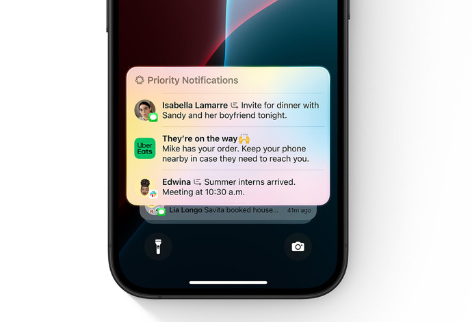
Messages including emails will now allow users to view summaries of the email which conveys the most useful information as opposed to just seeing the first lines of an email.
For you as digital communicators, this could shift the focus from just having to focus on your subject line as now the summary of information could prove important in getting your audience to open your emails.
Notifications will also include a short overview of what the message is about, rather than just who it is from. Any notifications classed as ‘priority’ by Apple’s intelligence will be displayed more prominently so that users are alerted about potentially more important information.
Could this mean providing urgency in your emails message and using words such as ‘Now’ or ‘Soon’ will put your emails into contacts priority notifications? This is something we are yet to know but we’ll be keeping an eye on!
More AI controversy!!!
Due to Apples Intelligence using AI, this has led to some unexpected results with incorrect notifications being sent to iPhone users. The BBC in particular have not been pleased with this and as a result they have recently urged Apple to withdraw their “out of control” AI news alerts being sent to users by the ‘Apple intelligence’ feature.
See one example below 😲😲😲
BBC notification
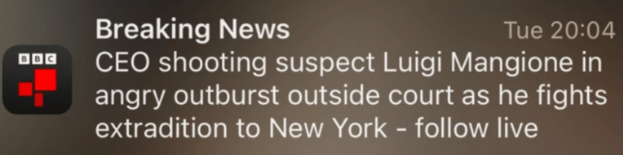
AI generated notification
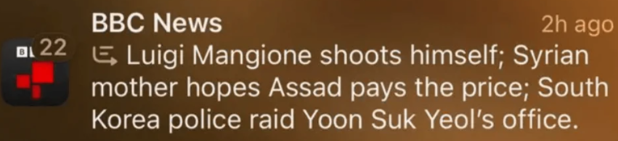
Read more from the BBC’s response to Apple here.
Device categorisation
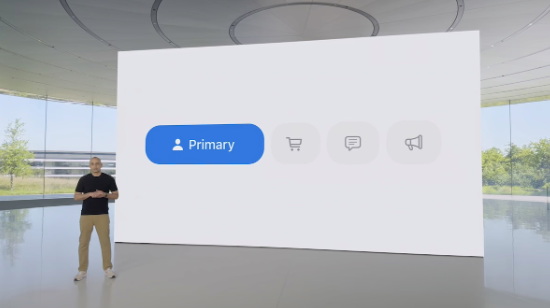
Apple Mail on iOS 18 is introducing a new way to stay on top of all your incoming mail with a new feature called ‘device categorisation’.
Statistics show on average a person receives 121 emails per day! Thats a lot of emails! Typically, with Apple Mail we are used to all of these emails going into our main inbox except for ones that have already been picked up as spam etc. As a result of this user's inboxes often felt cluttered with too many messages, potentially leading to important messages being missed.
iOS 18 will introduce a categorisation system that sees your emails sorted into four tabs, those being:
Primary
Transactions
Updates
Promotions
The ‘Primary’ category will show emails that are most important to you, such as ones from saved contacts or something containing time sensitive information. All other emails will fall into one of the other categories depending on several factors such as, is it an order receipt, a newsletter or a general promotional email.
Apple define what falls under each category as:
Primary: Personal messages and time sensitive information e.g. and email from your GP
Transactions: Keep track of your confirmations, receipts, and shipping notices e.g. and email confirmation email from a recent shopping purchase.
In our transactions section, we also found some customer ‘confirm your subscription’ emails landing here.
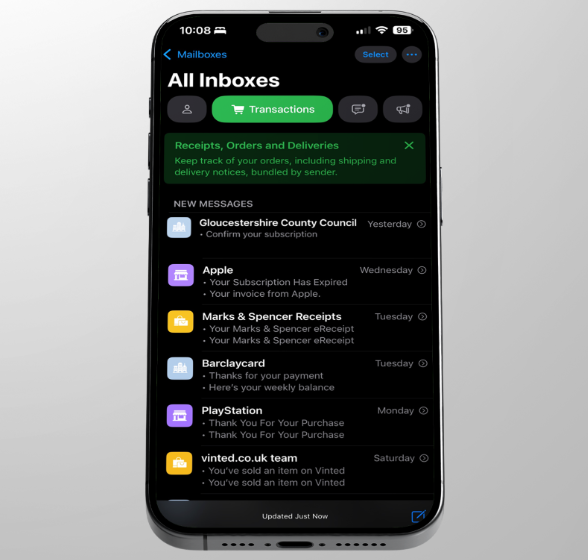
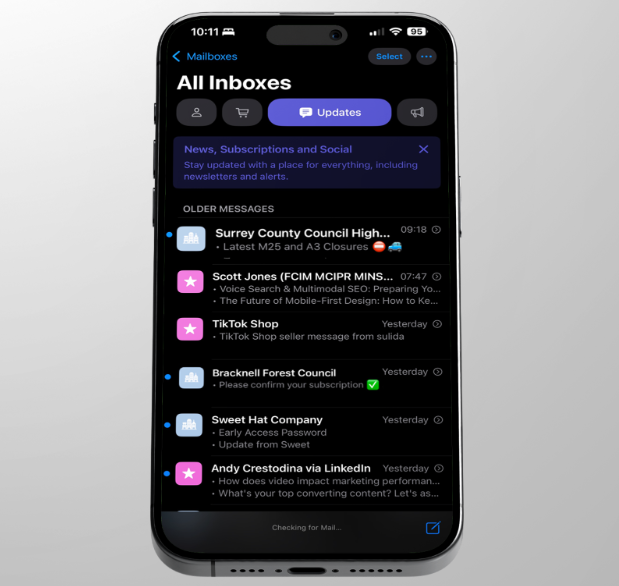
Updates: Catch up on news, newsletters, and social updates e.g. your local council's weekly newsletter.
Promotions: Browse your coupon and sales emails e.g. your favourite brand is offering you a 10% off discount.
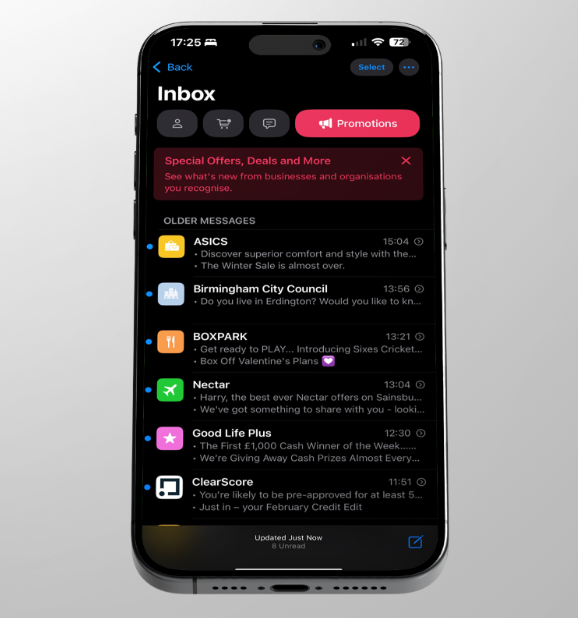
Interestingly, we heard that Apple Mail users were complaining about emails going into the incorrect sections, particularly into the ‘Promotions’ tab. So... We decided to put this to the test and subscribe to some of our customers' emails to see where they landed.
And just like that, within a day of testing, we found a customer's (Birmingham City Councils) event email go into the ‘promotions’ tab. Really this should have gone into the ‘Updates’ section.
Can you change an email's category once Apple has determined it?
The answer is yes you can for most emails, here’s how you can do it:
Go to Mail
Click either of the Transactions, Updates or Promotions tabs across the top of Mail app
Click onto the email you wish to recategorise
Click the three dots in the top right corner
Select ‘Categorise Sender’
You can manually categorise messages from a given sender to another category or continue to let Apple automatically categorise them.
Can you get rid of this feature?
If you don't like the mail categorisation on your own iPhone device, yes you can switch to a different view. To do this:
Head to mail
Click the three dots in the top right corner
Select list view
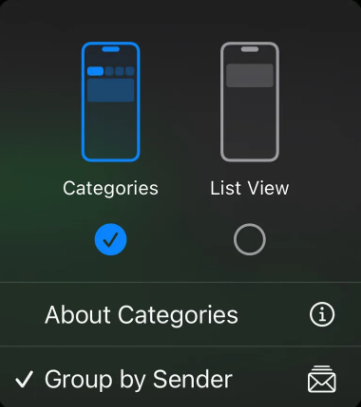
After choosing list view, your emails will populate in from top to bottom like they did previously.
iCloud mail clean up
In this update, users will be given new tools which can be used to help clean up their email inboxes. The main tool being the introduction of time-based rules for removing those old email messages that have sat in your inbox for weeks, months or even years!
Whilst this does not directly affect your communication methods, it is something to be aware of moving forward. Especially as local authority communicators, one of your organisations objectives is likely to be improving the environment for the better.
The main goal for this new tool is to ensure users can easily have access to a clutter free inbox but what many may not realise is this move from Apple can also be classed as a way they are helping the environment. Now why is that you ask?
Many of you will know that CO2 is produced to send and receive emails but what some people don't know is that it is also used to store emails! With Apple introducing this feature to clean up our inboxes they are also helping users to improve their carbon footprint but getting rid of those unwanted emails that are just sitting in the inbox.
Business view
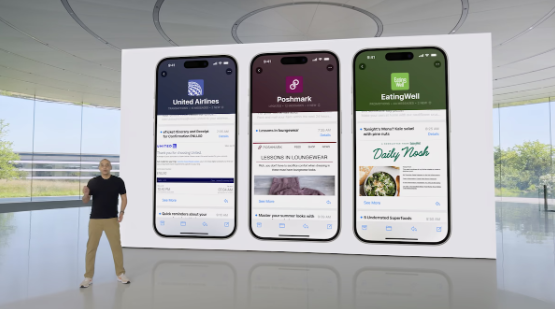
Digest view for businesses is another new feature with iOS 18, it will see all of your email sent from a business put into one view, enabling users to see all the emails they have ever received from a business.
This change means that instead of having to use the search tools to find emails from one business then going back and looking for another will no longer be the case as all the emails can be viewed in one place. Users will also have the ability to edit their business view to minimise or maximise certain elements.
For those of you who may be looking to set up a profile so Apple users can make use of this feature with your emails, this Apple article may help you get on your way.
Now if you are familiar with BIMI, you may be wondering if Apple’s business view, is similar. The short answer is yes, it is, but should this take president over any other BIMI work you could already be doing, absolutely not. This specific process is unique to Apple.
So, what's the difference? Well firstly the setup is completely Apple based, you can find more about how to begin setting it up here. Secondly, Apple’s business view is free! BIMI also requires a verified mark certificate (VMC), which heightens its credibility and trustworthiness, although it's important to note here the Apple Business view will only work on Apple devices and Apple Mail.
The key similarity is that both Apple Business and BIMI require a sending domain which is protected with DMARC. You can find Apple’s documentation on DMARC here. Although if you are an e-shot customer, you can rest assured that this is all set up correctly as our technical experts make sure it is (and test it for you).
Conclusion
To conclude we believe that overall, these changes really aren’t something for you to worry about... yet at least!
With Apple, we can be sure to see more updates and changes to these features and Apple Mail in general, at which point we will reassess but right now keep going as you are!
As an Apple Mail user myself, I must say the new categrisation is a big no no for me! As we covered, I discovered emails going into the wrong sections and although I can mainly update these, I just don't want to spend hours categorising my emails. Further to this, Apple as part of this update don't seem to notify you when you have unopened emails to view and so as someone who likes to keep up to date with their email, the user experience at the moment almost seems like a downgrade! So, I personally have switched back to the old list view.
Solutions

Email Marketing
Create email campaigns and newsletters and manage end-to-end subscription processes with forms and preferences.

Marketing Automation
Create sophisticated automated campaigns for email and SMS combined.

Digital Communication
The comprehensive solution to manage and automate your digital communication across email, SMS, websites and landing pages.

Email marketing healthcheck
We are confident that we can help you, which is why we offer a free healthcheck to identify potential issues with your current programme and free advice on things that could be done to improve it.